The short answer
A refused connection to TWS or IB Gateway is almost always a setting, not an outage. Check these in order:
- TWS or IB Gateway is running and fully logged in.
- Socket clients are enabled in the API settings.
- The port in your tool is the port shown in TWS or IB Gateway.
- The tool connects from the same computer, or from an address TWS trusts.
- No other tool is using the same client ID.
If the connection worked earlier in the day and then dropped, skip to the section on the daily restart.
Is the API switched on?
The socket API is off until you enable it. In Mosaic open the File menu, in Classic TWS the Edit menu, then Global Configuration, then API, then Settings. Check Enable ActiveX and Socket Clients.
Check it again after an update. IBKR’s release notes say that TWS and IB Gateway 10.45 clear this setting, and the “Allow connections from localhost only” setting, once during the upgrade, and show a pop-up about it. A tool that connected yesterday can be refused today for that reason alone.
Is it the right port?
The Socket port field on the same settings page is the port your tool must use. IBKR’s defaults are:
| Application | Live port (default) | Paper port (default) |
|---|---|---|
| TWS | 7496 | 7497 |
| IB Gateway | 4001 | 4002 |
A common mistake is to switch from a paper session to a live one, or from TWS to IB Gateway, and leave the tool on the old port. The defaults can be changed, so read the number from your own settings page.
Is the connection trusted?
TWS keeps a list of trusted IP addresses. A connection from a trusted address is accepted without a question. Any other connection brings up a message in TWS asking whether to accept it, and the tool waits until you answer.
If a tool hangs while connecting, look at the TWS window for that prompt. A tool on the same computer connects through the loopback address, 127.0.0.1. Do not open the API port to other machines or to the internet.
Is another tool using the same client ID?
Each program connected to the API identifies itself with a client ID. Two programs with the same ID disconnect each other. If you run more than one tool, or two copies of one, give each its own ID.
The Master API client ID on the settings page is a different thing: it names the one client that also receives orders placed by other API clients. Leave it empty unless a tool’s instructions ask for it.
Connected, but orders are refused?
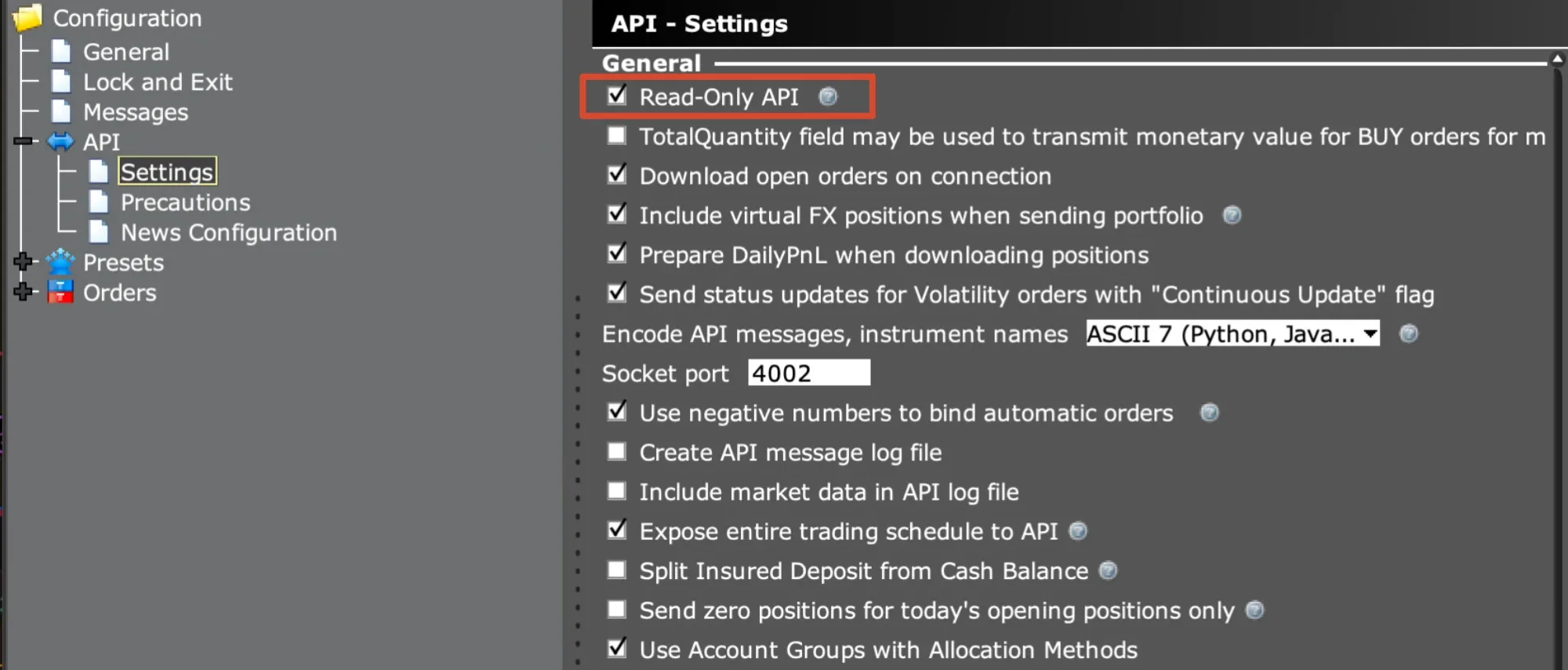
Then the connection is fine and the API is in read-only mode. With Read-Only API checked, a tool can read market data and account information and cannot trade. Uncheck it for any tool that has to place orders.
A new installation of TWS or IB Gateway has Read-Only API checked, so expect this the first time you connect a tool that trades.
Why does the connection drop every day?
TWS and IB Gateway do not stay logged in indefinitely. Under Lock and Exit in Global Configuration there are two timers: Set Auto Log Off Time and Set Auto Restart Time.
- Auto log off ends the session at the time you set. You log in again by hand.
- Auto restart restarts the application at the time you set without asking for your credentials again.
- Once a week you still log in by hand. IBKR invalidates the security tokens each Sunday at 1:00 am ET, and the first login after that needs manual authentication.
IBKR lists what can stop an automatic restart: a computer that is asleep, hibernating or without power at the scheduled time, and an operating-system update that reboots the machine. Set the time outside your trading session, and keep the computer awake while a tool is managing positions.
What does OptionTrigger do when the connection returns?
Desktop shows the state of each link on its Connections page. After a disconnect or restart, the backend first compares its records with the broker’s orders, executions and positions, and holds new execution until that check finishes.
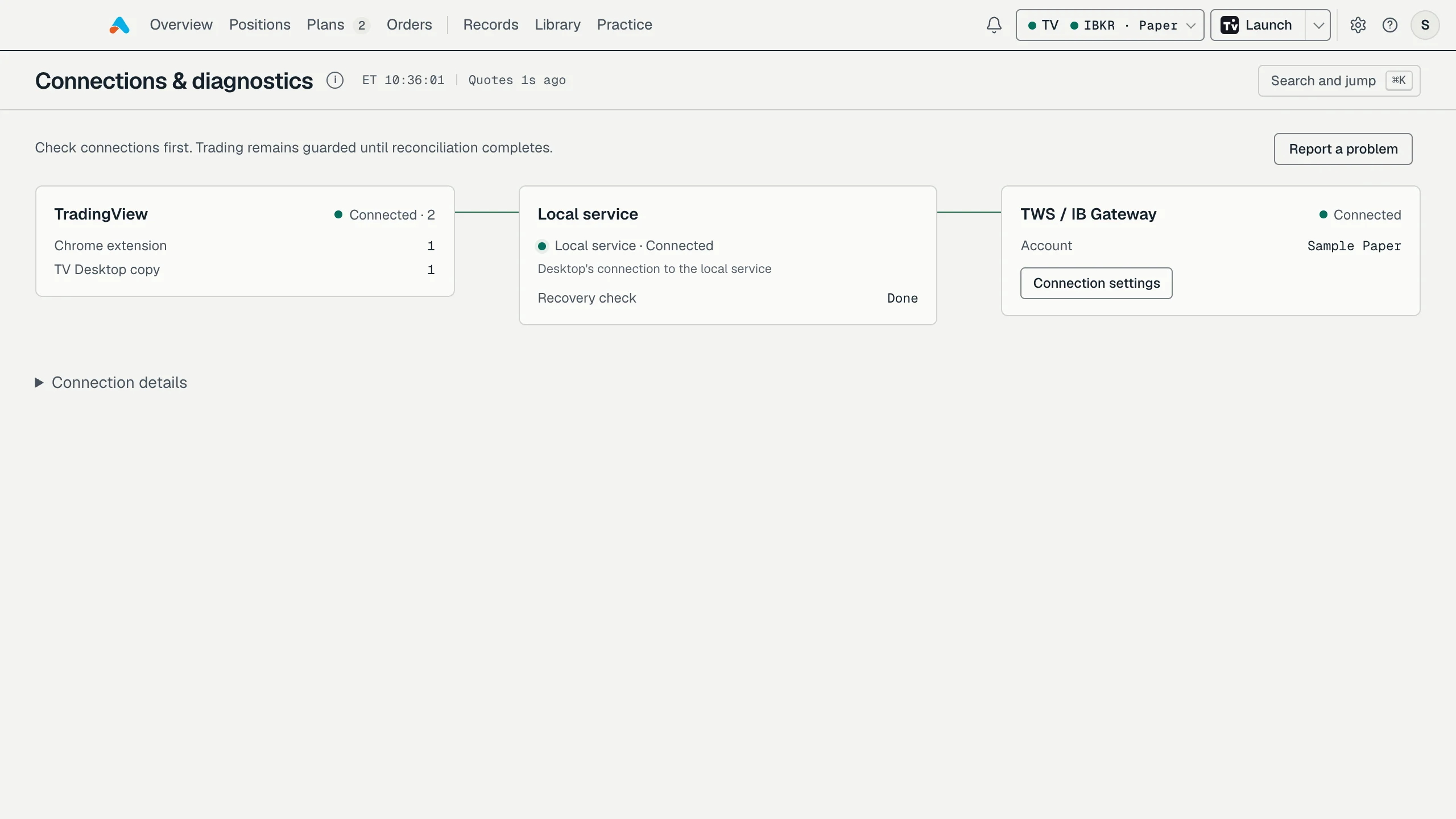
Exits do not run while the broker is disconnected. If you hold a position when TWS restarts, watch it in TWS until Desktop shows the connection and the recovery check as done. Setup for OptionTrigger itself is in connect IBKR TWS or IB Gateway.
Official references
The settings named here are documented by Interactive Brokers:
Frequently asked questions
Why is my TWS API connection refused?
Most often because Enable ActiveX and Socket Clients is not checked, the tool uses a different port from the one in the API settings, or TWS has not finished logging in.
Which port does the TWS API use?
The Socket port in the API settings. IBKR’s defaults are 7496 for TWS live, 7497 for TWS paper, 4001 for IB Gateway live and 4002 for IB Gateway paper.
Why did the API stop working after a TWS update?
TWS and IB Gateway 10.45 clear the socket-clients setting and the localhost-only setting once during the upgrade. Open the API settings and enable them again.
Can I keep TWS logged in all week?
Auto restart keeps it running from day to day without a new login. Once a week, after IBKR invalidates the security tokens on Sunday at 1:00 am ET, you have to authenticate by hand.
Is IB Gateway more stable than TWS for API tools?
IB Gateway is the same API with a minimal window and no trading screens. It needs the same login, the same API settings and the same weekly authentication.