The short answer
After the first target fills, many traders move the stop on the rest of the position to their entry. On an option trade that sentence hides a choice: the entry price of the stock, or the price you paid for the option.
They are not the same point. If the stock comes back to where you entered an hour later, the option is usually worth less than you paid, because time has passed and volatility may have dropped. A stop at the stock’s entry price protects the idea, not the premium.
What are the two kinds of breakeven?
| Stop at the stock’s entry price | Stop at the option’s cost | |
|---|---|---|
| What it watches | The underlying stock | The option’s own quotes |
| What it says | The move you traded has been given back | The remaining contracts are back at cost |
| Loss on the remaining contracts | Possible, from time decay and lower volatility | Small, apart from the spread and slippage |
| Can trigger while the stock holds up | No | Yes, on a wider spread or falling volatility |
What does that look like in numbers?
An illustration, not a forecast. You buy 10 calls at $2.00 with the stock at $185.00. The first target at $187.20 sells 5 at $2.90, a gain of $450. You move the stop to $185.00 on the stock.
An hour later the stock is back at $185.00 and the call is quoted near $1.80. The remaining 5 are sold for a loss of $100. The trade ends up $350, not $450. The stop did its job on the chart, and the first target paid for what the option lost.
That is the usual reason to take part of the position off first: the breakeven stop then guards a trade that is already in profit overall.
How do I move the stop in TWS?
- A stop on the option. Modify the working stop order: raise its price to your cost and reduce its quantity to the contracts you still hold.
- A stop on the stock price. A conditional order holds a fixed price, so cancel it and enter a new one with the breakeven level and the remaining quantity.
Either way, check the quantity. An exit order for more contracts than you hold is no longer an exit.
How do I do it in OptionTrigger?
Drag the stop line on the TradingView stock chart to your entry level. Once a position is open, the stop may sit at breakeven or on the profit side. The stop always covers what remains, so there is no quantity to edit after a target fills.
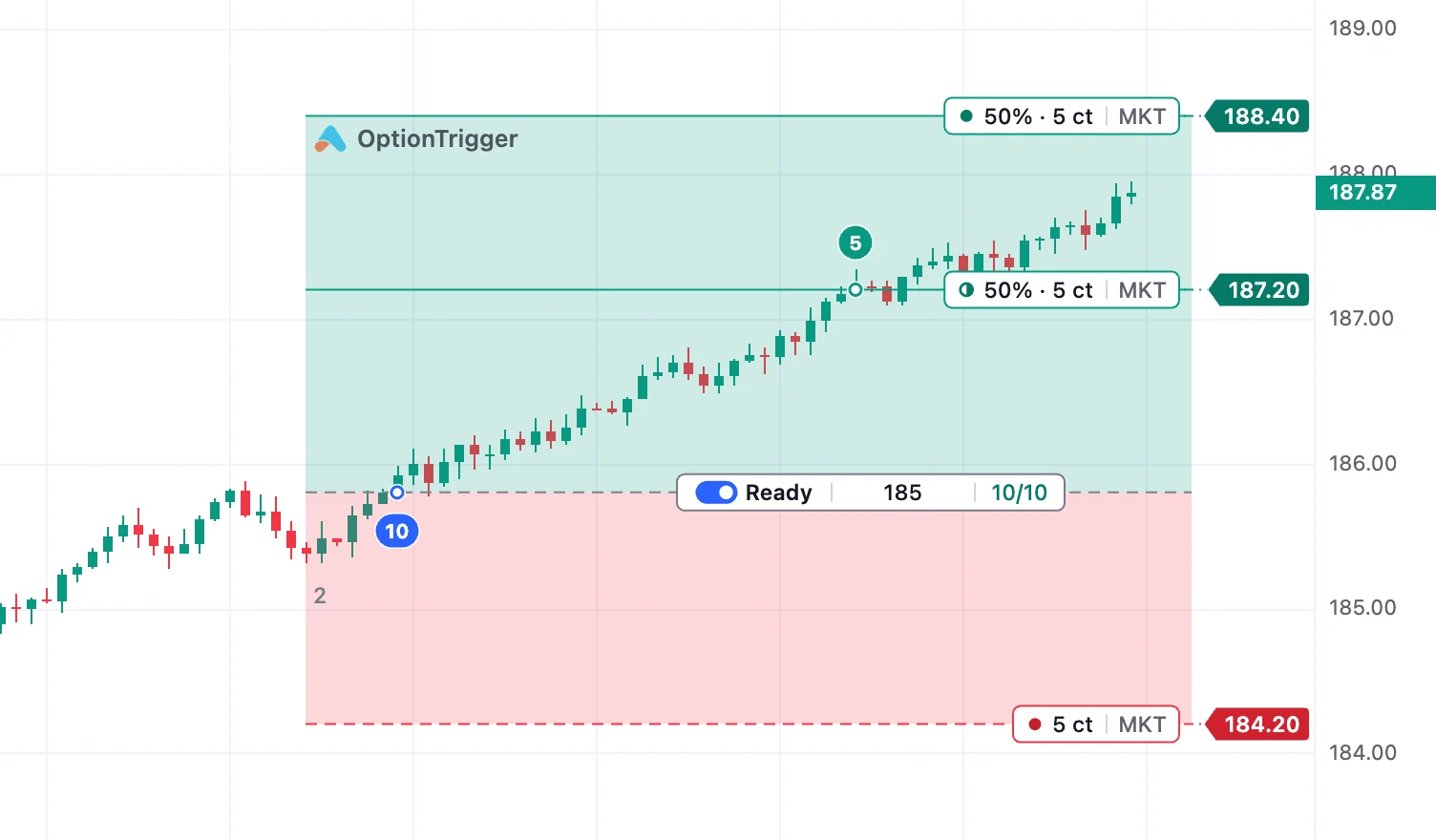
OptionTrigger does not move the stop to breakeven by itself. You move the line, or you turn on trailing and let the stop follow the stock instead. See a trailing stop on an option that follows the stock. Its stops are levels on the stock; it does not place a stop at the option’s cost.
When does a breakeven stop hurt?
When it is moved too early. Right after the first target the stock often pulls back toward the entry before it continues, and a stop at the entry sells the rest on that pullback.
Two common answers are to wait for the stock to clear the first target by some margin before moving the stop, or to move it to a level the chart gives you, such as the last higher low, instead of the entry itself.
Frequently asked questions
Should I move my stop to breakeven after the first target?
It is a common way to protect a trade that has already paid. The cost is being stopped on an ordinary pullback, so many traders wait for some distance beyond the first target before moving it.
Is breakeven on the stock the same as breakeven on the option?
No. When the stock returns to your entry price later in the day, the option is usually worth less than you paid, because of time decay and changes in volatility.
Can OptionTrigger move the stop to breakeven automatically?
No. You drag the stop line to the level you want, or use a trailing stop on the stock. The stop covers the remaining contracts without any quantity change.
Can I put the stop above my entry?
Yes. Once the position is open, the stop can sit at breakeven or on the profit side of the entry.