What is OptionTrigger?
Learn what OptionTrigger is, its core features, and how it helps options traders visualize, plan, and execute trades directly from TradingView charts
OptionTrigger is a powerful options trading assistant that integrates directly with TradingView, helping traders visualize, plan, and execute options trades with precision and ease.
In a nutshell: OptionTrigger enhances TradingView's Long/Short position tools with options-specific features like real-time option prices, smart contract selection, and one-click order placement.
Why OptionTrigger?
Options trading requires juggling multiple variables: strike prices, expiration dates, position sizing, and risk management. Traditional workflows involve switching between multiple platforms, manually calculating position sizes, and hoping you don't make mistakes during execution.
OptionTrigger solves this by bringing everything into one place - your TradingView chart.
Core Value Propositions
Visual Trade Planning
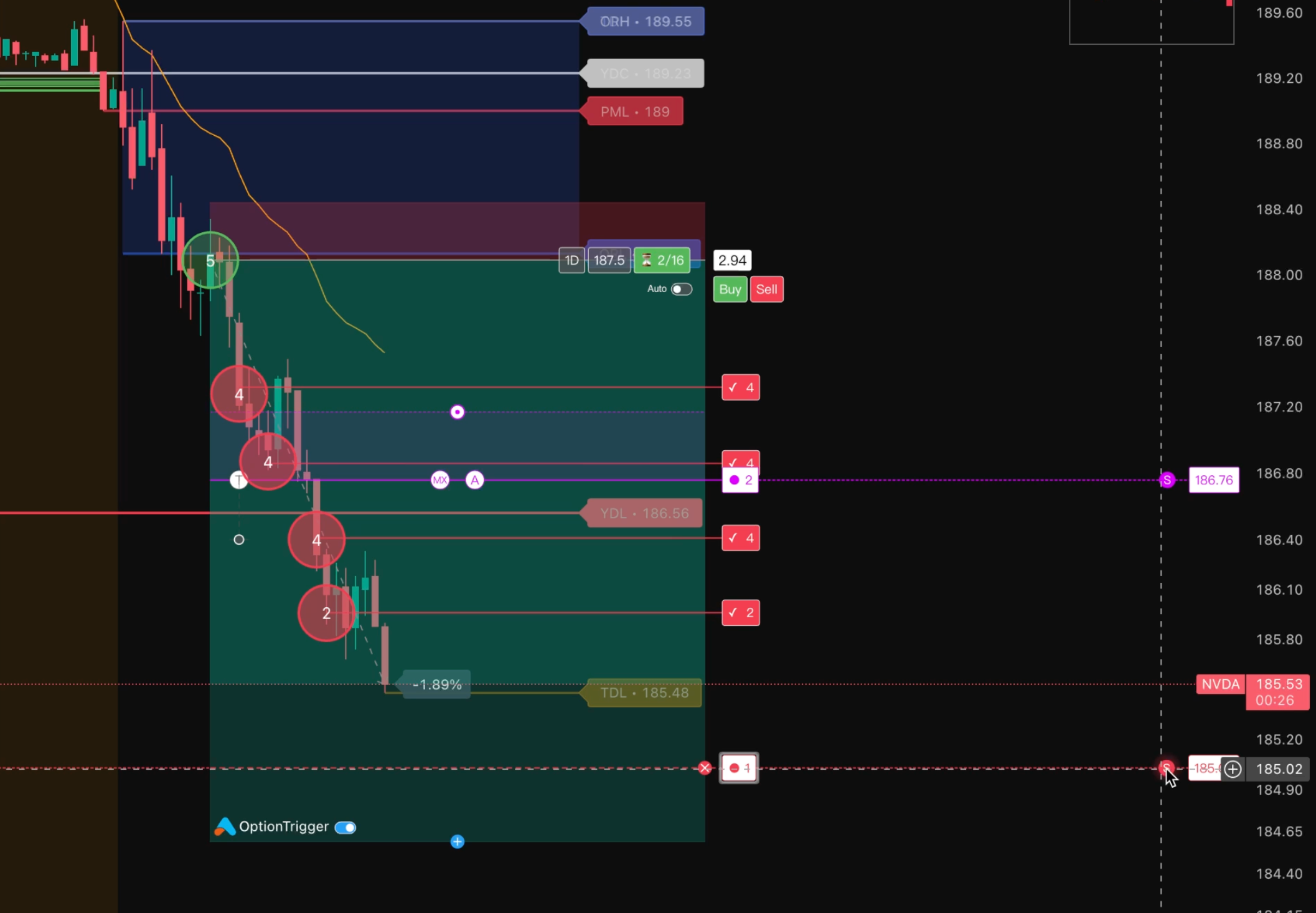
Plan your trades directly on the chart with enhanced Long/Short position tools:
- Entry Circle: See exactly where you're entering the trade
- Multi-Level Take Profit: Set unlimited TP targets with custom close percentages
- Three Stop-Loss Modes: Choose between Wick SL, Body SL, or Hybrid SL based on your trading style
Smart Contract Selection (AutoSize)
Let OptionTrigger automatically select the optimal option contract based on your risk parameters:
- Define your maximum risk per trade
- AutoSize finds the best strike and expiration
- See real-time option prices before you commit
One-Click Order Execution
Execute your planned trades with a single click:
- No more switching between platforms
- Orders go directly to your broker (IBKR today; Moomoo in development)
- Real-time order status updates on your chart
- Per-leg order modes: Market or limit for Entry, Take Profit, Stop Loss, and Close — Order Mode guide
Who is OptionTrigger For?
OptionTrigger is designed for:
- Active Options Traders: Who want faster execution and better visualization
- TradingView Users: Who already use TradingView for charting and analysis
- Risk-Conscious Traders: Who want precise position sizing and stop-loss management
- IBKR users: Who trade options through Interactive Brokers (Moomoo support planned)
OptionTrigger is a trading tool, not financial advice. Always understand the risks of options trading before placing real trades.
Product Components
OptionTrigger consists of four integrated components:
| Component | Description |
|---|---|
| Chrome Extension | Injects trading tools into TradingView charts |
| Desktop App | Manages the backend, SSL certificates, and extension injection |
| Broker Backend (Rust) | Connects to your broker (IBKR) for trading |
| Website | Account management, subscriptions, and help documentation |
How They Work Together
TradingView Chart → Extension (UI) → Backend (API) → Broker (TWS/OpenD)
       ↑                  ↑               │
       │                  │               ▼
   Price Data      WebSocket ◄──── Real-time Updates
Free vs Premium
OptionTrigger offers both free and premium tiers:
| Feature | Free | Premium |
|---|---|---|
| Long/Short Position Tools | ✓ | ✓ |
| Multi-Level Take Profit | ✓ | ✓ |
| Three Stop-Loss Modes | ✓ | ✓ |
| Option Chain Viewer | ✓ | ✓ |
| Real-time Option Prices | 15-min delayed | Real-time |
| AutoSize Smart Sizing | - | ✓ |
| Order Placement | - | ✓ |
| Position Management | - | ✓ |
Start with the Free tier to explore the planning tools, then upgrade to Premium when you're ready to execute trades.
See It In Action
Explore the Quick Start Guide to see OptionTrigger in action and get started in minutes.
Next Steps
Ready to get started? Here's what to do next:
- Quick Start Guide: Get up and running in 5 minutes
- Desktop Setup Guide: Complete installation walkthrough
- Placing Your First Order: Execute your first trade
- Trade Options on TradingView — brokers, tools, workflows
- Options Trading Automation Playbook — webhooks vs chart-native execution
- IBKR + TradingView for Options — permissions, TWS, troubleshooting
Questions? Join our Discord community or email us at [email protected].